


Disclosure: This article contains affiliate links. If you click through and make a purchase, we may earn a small commission at no extra cost to you.
The short answer, not entirely, at least not yet. QuickMagic AI doesn’t match the studio-grade precision of high-end optical motion capture, but for prototyping, previs and indie production, it offers an accessible alternative. The artificial intelligence platform converts ordinary videos, or even simple text prompts, into editable 3D animation data, capturing full-body, hand and facial movement without suits, reflective markers, sensors or a multi-camera studio. The browser-based service accepts footage recorded with a phone, a webcam or a regular camera, and exports the resulting motion to Blender, Unreal Engine, Unity, Maya, 3ds Max, MotionBuilder and other major 3D programs.
The company describes QuickMagic as an AI motion capture and motion generation tool for creators, studios and robotics teams. Its goal is to take a process that has traditionally depended on expensive setups and put it within reach of indie game developers, animators, VTubers, digital content creators and anyone who wants to bring a 3D character to life using recorded movement. The platform offers a free plan to try the technology, along with four paid tiers aimed at regular creators, professionals and studios.
How QuickMagic turns videos and text into 3D motion
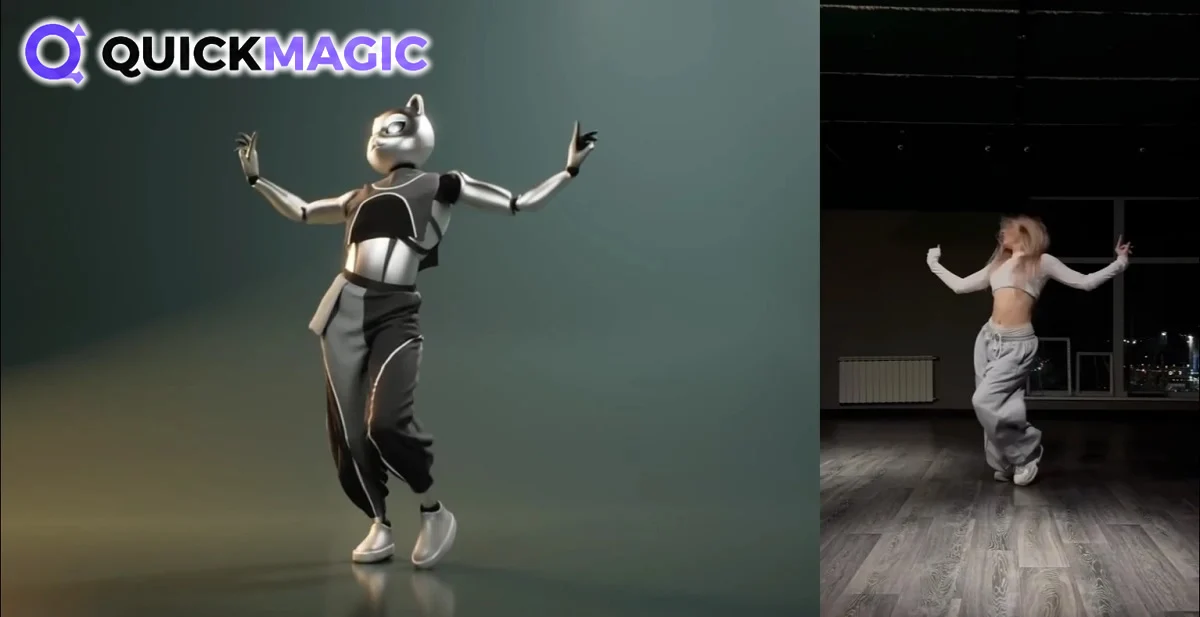
The core feature is Video to Motion. The user uploads a clip, selects the subject and capture options, and the AI estimates the movement frame by frame. Once processing is complete, the result can be previewed and exported in the format needed to continue editing in 3D software. QuickMagic supports full-body and upper-body capture, hand and facial motion options, single and multi-person workflows, and footage from both static and moving cameras, as well as controls for pose, frame rate and motion cleanup.
The company is upfront about the technology’s limits. It explains that results depend on how visible the subject is, motion blur, occlusion, camera movement and the type of action being captured. Its recommendations include recording clear footage with adequate lighting, keeping the person visible and using full-body framing for full-body capture. It also warns that complex floor contact, fast spins or close interaction between people may require additional cleanup.
Processing time varies depending on video length, resolution, selected features, queue load and plan priority, and the interface shows the status of each job. For multi-person capture, QuickMagic recommends keeping each person visible and avoiding prolonged overlap or leaving the frame, while footage from moving cameras can lose stability due to camera shake, rapid viewpoint changes and occlusion.
The second major feature is Text to Motion. Instead of recording a performance, the user describes an action, pose or character performance in plain language, and QuickMagic generates an editable motion draft that can be previewed, exported and refined within an animation pipeline. The company aims this tool at storyboards and previs, game and animation prototypes, character performance ideas, and content for MMD, VTubers and digital humans.
In its learning guide, QuickMagic explains the difference between both methods: video capture reconstructs a specific recorded performance, making it the right choice for precise choreography or acting, while text generates a brand-new action when a motion concept is needed without recording a performer.
The platform also has a third use case focused on humanoid robots. QuickMagic can generate human-motion references from video or text for simulation, imitation-learning experiments and behavior prototyping. Its export options currently include presets for the Unitree G1, H1 and H1_2 robot models, extending the technology beyond animation and video games into research and testing workflows.
Blender, Unreal, Unity and a growing creator community
QuickMagic exports motion in FBX, BVH, BIP, C4D, VMD, Mixamo, UE4, UE5.5, UE5.6, Character Creator & iClone, Roblox, OnlyFace and UniRobot formats. That makes it compatible with Blender, Unreal Engine, Unity, Maya, 3ds Max, MotionBuilder, MikuMikuDance, Cascadeur, iClone, Roblox, UEFN (Fortnite) and Cartoon Animator, among other 2D and 3D pipelines. The company clarifies that export availability varies by plan and workflow.
Several creators have already shared their results. YouTuber Charlie Driscoll said QuickMagic “might be the best single camera AI mocap solution I have seen or used.” Creator Defonten recorded simple videos in his room, uploaded them to the platform, downloaded the FBX files and imported them into Unreal Engine to retarget the animations onto free Paragon characters.
One of the most important endorsements comes from Reallusion, the company behind iClone. Through a partnership with QuickMagic, Reallusion launched iClone Video Mocap, a feature powered by QuickMagic’s AI engine that converts YouTube clips, movie scenes or quick phone recordings into editable 3D motion data ready to apply to any 3D character.
Independent reviews agree on the tool’s accessibility and speed, highlighting it as a strong option for prototyping, previs and indie production, although they note it doesn’t aim to replace high-end optical capture with studio-grade precision. Some users also mention a learning curve when refining results and occasional interface bugs. QuickMagic itself acknowledges that many clips can be used quickly for previews, but production animation often requires validation and cleanup.
QuickMagic prices, plans and limits
QuickMagic offers a free plan that includes 50 V Coins, the lowest queue priority, two videos in the queue at the same time, videos up to 30 seconds, uploads up to 50 MB, capture for one person, FBX export only and 15 days of asset storage. The free plan doesn’t include a commercial license, so it works for experimenting but not for monetized projects.
All paid plans include access to both of QuickMagic’s product lines, Mocap and Avatar. The Basic plan costs $14.90 per month, or $11.90 per month billed yearly, and includes 200 credits, videos up to 60 seconds, 100 MB uploads, capture for up to two people, expanded export formats including Unreal, Unity, Mixamo and Roblox, and a commercial license. The Pro plan, labeled as the most popular, costs $49.90 per month or $39.90 billed yearly, with 1,000 credits, 90-second videos, 200 MB uploads, high queue priority and capture for up to three people.
The Max plan costs $179.90 per month or $143.90 billed yearly, with 5,000 credits, 120-second videos, 300 MB uploads, the highest queue priority and capture for up to four people. The Studio plan costs $499.90 per month or $399.90 billed yearly, with 20,000 credits, a dedicated queue, 120-second videos, 400 MB uploads, capture for up to six people and three team seats listed as opening soon. The Studio plan doesn’t include API access, which is offered through separate API plans and custom enterprise solutions. In all cases, commercial use also depends on the user holding the rights to the uploaded footage, characters, audio and other source materials.
Paid plans also unlock Video Studio, QuickMagic’s AI avatar video generation tool, which uses the Seedance 2.0 model to generate MP4 clips of up to 10 seconds on the Basic and Pro plans, and up to 15 seconds on the Max and Studio plans.
Monthly credits don’t roll over to the next cycle, and QuickMagic doesn’t currently sell separate credit top-ups for personal plans, so users who run out must wait for the refresh or upgrade. The number of credits per task varies depending on the feature, model, video length, frame rate and processing method. When a subscription is cancelled, the account returns to Free, assets remain available for 15 days and then enter a seven-day deletion process, after which they are permanently erased. The company notes that QuickMagic is not a permanent backup service and recommends storing important files separately.
With a free plan, browser-based access and support for the most widely used 3D programs, QuickMagic positions itself as an accessible entry point to motion capture for creators without a studio, a suit or a big budget, and as a fast prototyping tool for those who already have them. If you want to see what your own moves look like in 3D, you can put QuickMagic to the test, for free, and get 20 free V Coins through our affiliate link. All you need is a video and a little space to move.
Would you swap the mocap suit for your phone camera? Tell us in the comments what you’d animate first with QuickMagic!