



Building a gaming PC is exciting, until you get to the power supply. Yeah, that boring metal box tucked in the corner of your case. But here’s the thing: your PSU is the heartbeat of your entire setup. Get it wrong, and you’re looking at random shutdowns, fried components, or worse. Get it right, and you’ll have a rock-solid foundation that powers epic gaming sessions for years to come.
Let’s break down what you actually need to know about choosing a gaming PSU in 2025, minus the engineering degree.
Wattage: More isn’t always better, but don’t go too low
First things first, how much power do you actually need? For a solid gaming rig, you’re looking at around 750W to 850W for most mid to high-end setups. Running something like an RTX 5070 or similar? That range will handle it comfortably with room to spare.
The key is headroom. You want your system running at around 50-60% of your PSU’s capacity during typical gaming loads. This sweet spot gives you the best efficiency and leaves wiggle room for future upgrades. Plus, your PSU won’t be screaming like a jet engine under load.
Here’s a rough guide: entry-level builds can get by with 500-600W, while absolute beast-mode systems with flagship GPUs like the RTX 5090 need 1000W or more. When in doubt, use an online PSU calculator, plug in your components and add 20-30% to whatever it suggests.
Form factor: Size actually matters
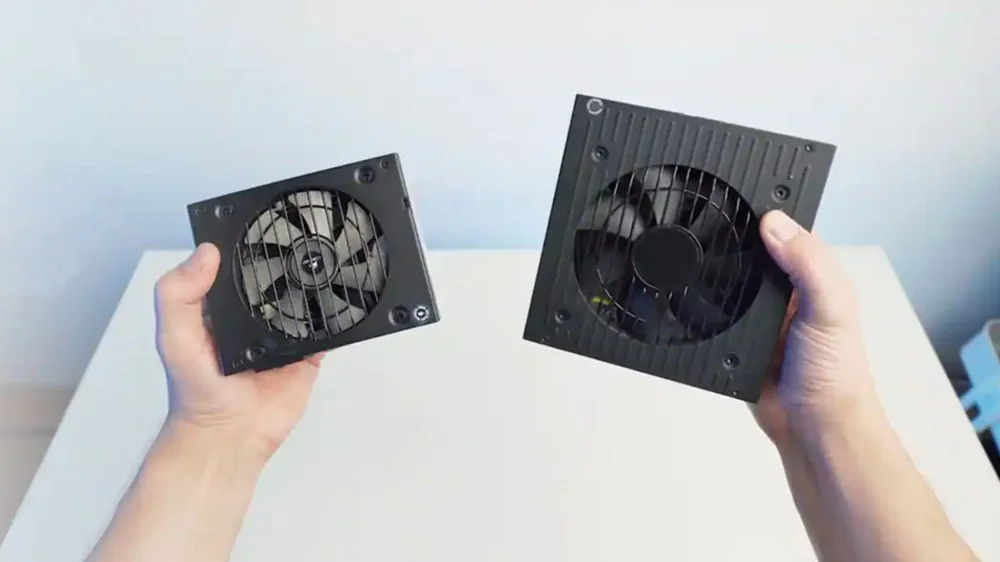
Before you even look at wattage or efficiency, you need to make sure your PSU actually fits in your case. There are two main form factors you’ll encounter as a gamer.
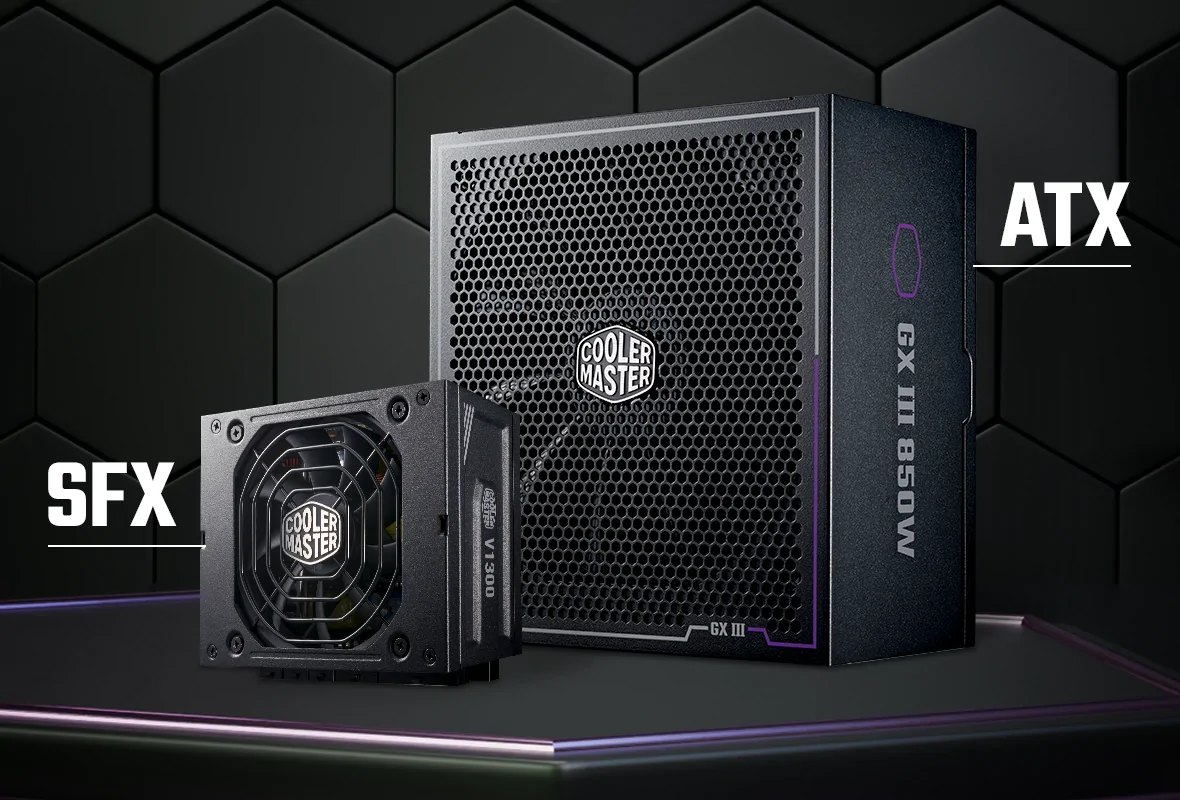
ATX: The standard workhorse
ATX power supplies have been the industry standard since the mid-90s, and for good reason. They measure around 150mm wide, 86mm tall, and 140mm deep (though high-wattage models can stretch longer). This larger size is actually a benefit, it allows for bigger fans that spin slower and quieter, better cooling systems, and more power connectors for your components.
If you’re building in a standard mid-tower or full-tower case, ATX is your go-to. You’ll find the widest selection of models, from budget-friendly 500W units to monster 1600W behemoths. The larger size also means manufacturers can pack in higher quality components and better cooling solutions.
SFX: Compact power
SFX (Small Form Factor) power supplies are the answer to the growing popularity of compact gaming builds. At just 125mm wide, 63.5mm tall, and 100mm deep, these little powerhouses are significantly smaller than their ATX cousins. Don’t let the size fool you, though, modern SFX units can deliver 850W or more, supporting even high-end gaming hardware.
The catch? SFX PSUs typically use smaller 80mm or 92mm fans, which means they might run a bit louder under heavy load compared to ATX units with larger fans. They also tend to cost more for the same wattage due to the engineering challenges of cramming all that power into a smaller package. Cable lengths are also shorter, optimized for compact cases, which is perfect for mini-ITX builds but could be limiting in larger enclosures.
Most SFX power supplies come with an adapter bracket that lets you mount them in standard ATX cases, giving you flexibility if you want to downsize later. If you’re building in a compact case or planning a sleek mini-ITX gaming rig, SFX is what you need.
80 Plus Certification: Your efficiency decoder ring
See those Bronze, Gold, Platinum badges on PSU boxes? They’re way more important than most people think. The 80 Plus certification isn’t just marketing fluff, it’s an independent testing program that tells you exactly how efficiently your PSU converts wall power into usable electricity for your PC.
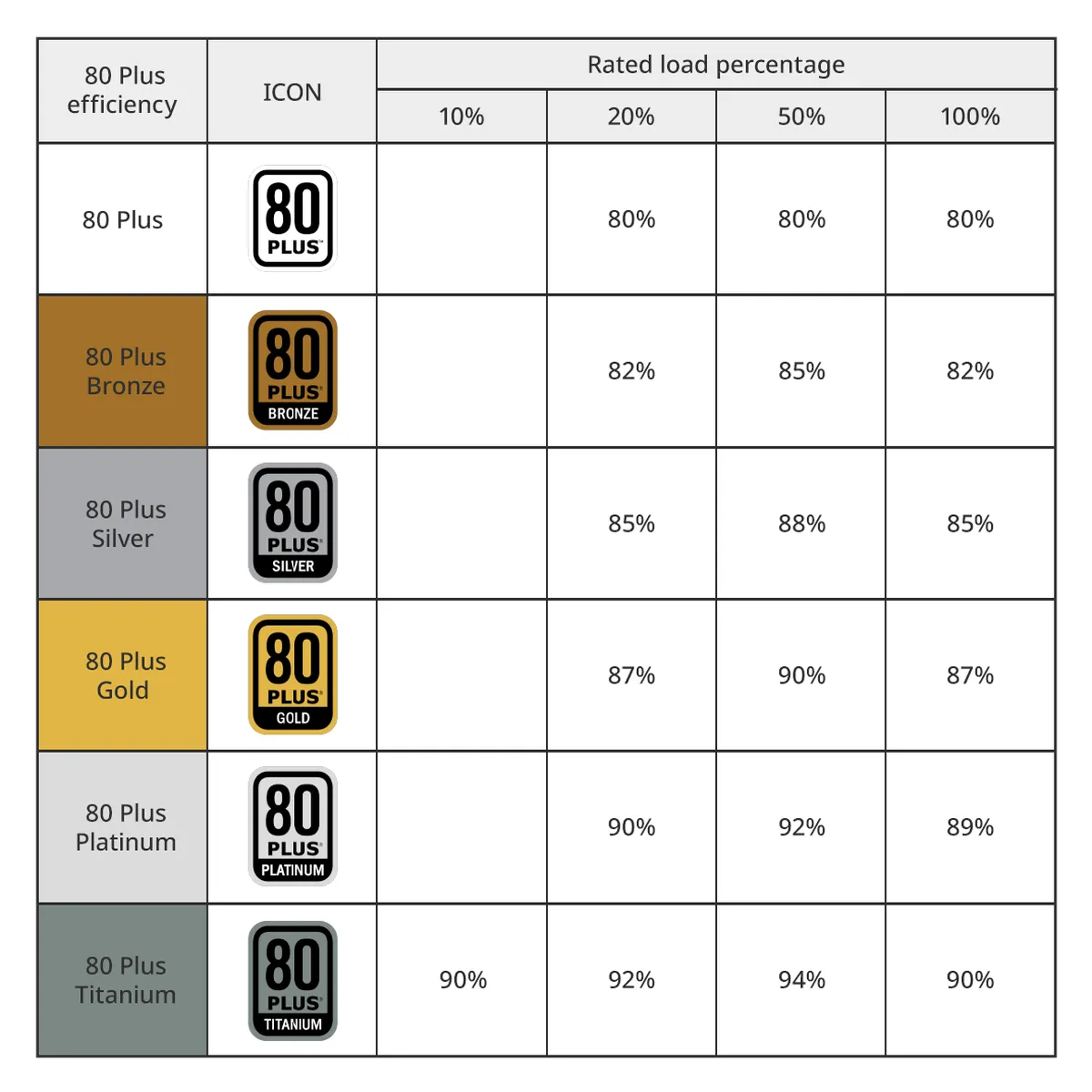
Here’s the deal: when your PSU pulls power from the wall, not all of it makes it to your components. Some gets lost as heat. The 80 Plus program tests PSUs at different load levels (20%, 50%, and 100%) to see how much power actually gets through versus how much gets wasted.
Breaking down the tiers
The certification levels work like a ladder, with each step offering better efficiency:
80 Plus Standard (White): The baseline. You’re getting 80% efficiency across all three load levels. That means 20% of your power becomes heat instead of fueling your gaming. These are rare nowadays, most manufacturers skip straight to Bronze.
80 Plus Bronze: A noticeable step up, hitting 82% efficiency at low and full load, and 85% at the sweet spot of 50% load. This is your budget-friendly efficiency tier. Perfect for entry to mid-range builds where you want decent performance without dropping serious cash.
80 Plus Silver: The middle child that nobody talks about. It delivers 85% efficiency at light loads and 88% at 50% load. Honestly, manufacturers tend to skip this one, they’d rather push Bronze for budget builds or Gold for premium ones.
80 Plus Gold: This is where most gamers should be looking. Gold certification means 87% efficiency at low and full load, jumping to 90% at 50% load. It’s the sweet spot between price and performance. You’re wasting less power as heat, which means lower temps, quieter fans, and smaller electricity bills over time.
80 Plus Platinum: Now we’re getting fancy. Platinum PSUs hit 90% efficiency at 20% load, peak at 92% at 50% load, and maintain 89% at full blast. These are for high-performance rigs or systems that run 24/7. The extra efficiency helps offset the higher upfront cost if you’re gaming hard regularly.
80 Plus Titanium: The top of the mountain. Titanium certification is serious business, 90% efficient at 10% load, 92% at 20%, 94% at 50%, and 90% at full load. Notice it’s the only tier tested at 10% load, which matters because modern CPUs and GPUs idle really low thanks to power-saving features. These PSUs are built for enthusiasts, workstations, and people who want absolute peak efficiency.
Why this actually matters
Higher efficiency isn’t just about saving a few bucks on your power bill, though that’s nice. The real benefit is less heat generation inside the PSU itself. Less heat means quieter operation because the cooling fan doesn’t need to work as hard. It also means longer component lifespan since heat is the enemy of electronics.
For gaming specifically, Gold certification hits that perfect balance. You’re getting solid efficiency that keeps your system cool during marathon sessions without paying the premium prices of Platinum or Titanium. Bronze works fine for budget builds, but once you’re investing in a decent GPU, it makes sense to match it with a Gold-rated PSU.
Modularity: Cable management matters
Walk into any PC case with a tempered glass side panel and you’ll see why cable management matters. The type of cable design your PSU uses can make the difference between a clean, professional-looking build and a rat’s nest of wires. Let’s break down your three options.
Fully modular: Maximum flexibility
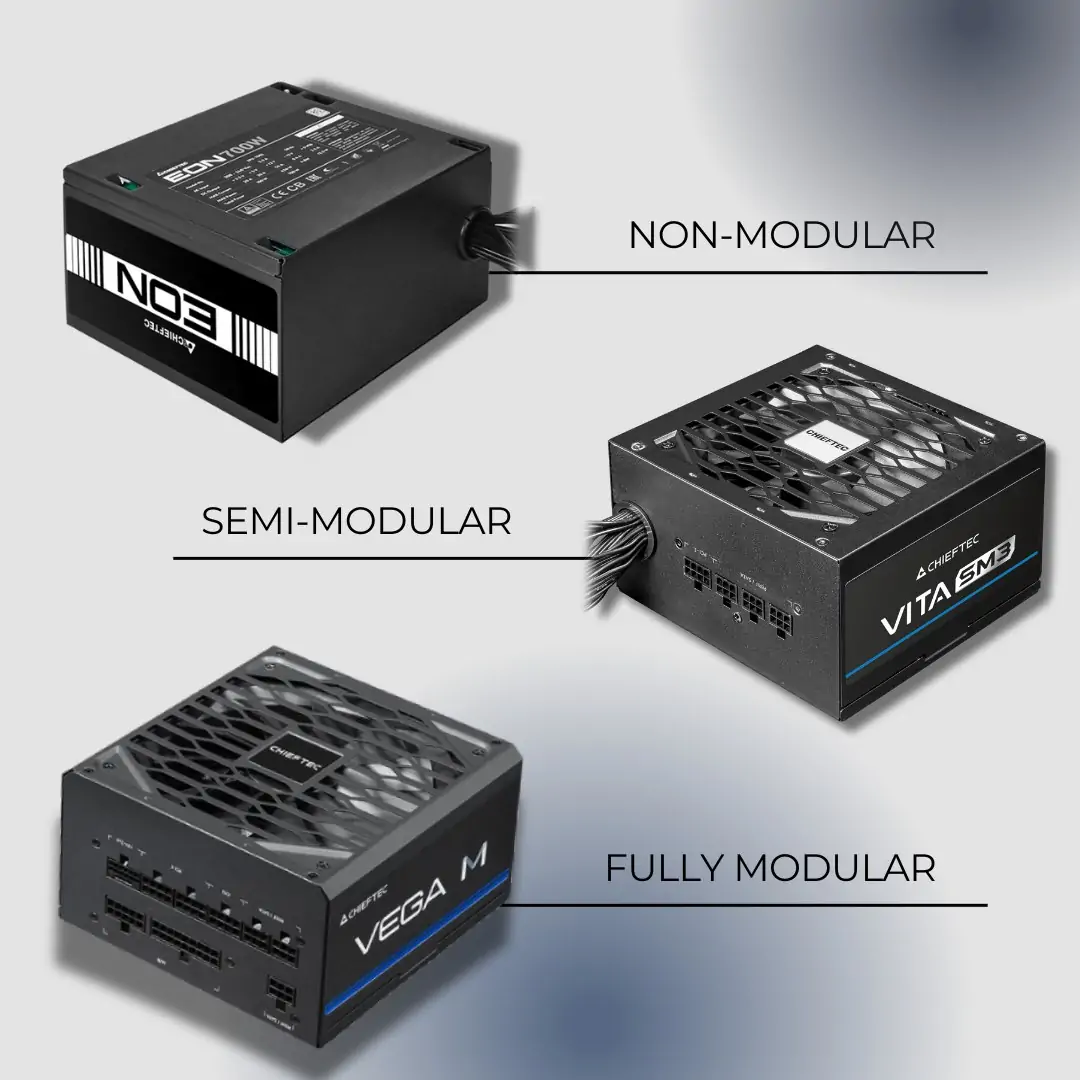
With a fully modular PSU, every single cable detaches from the unit, yes, even the essential 24-pin motherboard cable and the CPU power cable. This gives you complete control over your cable situation. Only need three SATA cables instead of six? Just plug in what you need and leave the rest in the box. This is the ultimate solution for clean builds, especially in cases with tempered glass panels where cable clutter is visible.
The downside? You’re paying a premium for this flexibility. Fully modular PSUs typically cost 10-20% more than their non-modular counterparts at the same wattage and efficiency level. But for enthusiasts who want that showroom-quality interior or plan to upgrade components frequently, it’s worth every penny.
Semi-modular: The smart middle ground
Here’s where most gamers end up, and for good reason. Semi-modular PSUs keep the essential cables permanently attached, typically the 24-pin motherboard connector and one or two CPU power cables, while letting you detach everything else like PCIe, SATA, and peripheral cables.
This design makes perfect sense because you’re going to use those main cables in literally every build anyway. Meanwhile, you still get the cable management benefits for all the optional connections. The permanently attached cables are usually bundled together nicely, making routing easier than it sounds. Best of all, semi-modular PSUs usually cost only slightly more than non-modular units, making them the sweet spot for value-conscious builders who still want a clean interior.
Non-modular: Budget-friendly simplicity
Non-modular PSUs come with every cable permanently soldered to the unit. You get what you get, and you’ll need to deal with the extras. This design is the most affordable option, and there’s something to be said for simplicity, there’s zero chance of forgetting to plug in a necessary cable or losing one during a build.
The challenge is managing all those unused cables. You’ll be tucking them behind the motherboard tray, stuffing them into drive bays, or wherever else you can hide them. In cases with good cable management features, this isn’t terrible. In compact cases or budget enclosures with limited cable routing options, it can get messy fast and potentially impact airflow.
Which one should you choose?
For most gaming builds, semi-modular is the way to go. You get most of the benefits of full modularity at a price point that doesn’t hurt. If you’re building in a premium case with a glass panel and want absolute perfection, go fully modular. If you’re on a tight budget or building a simple system in a closed case where nobody will see the cables anyway, non-modular will serve you just fine and save you some cash.
ATX 3.1 and the 12V-2×6 connector: Future-proofing done right
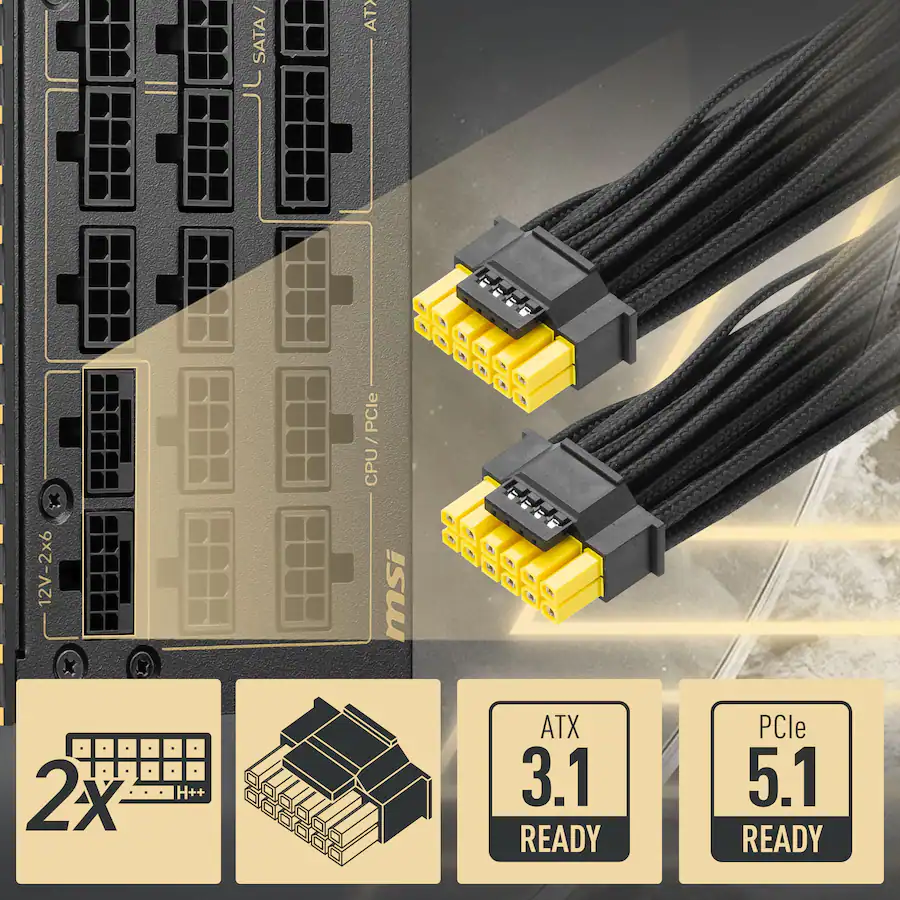
If you’re shopping for a PSU in 2025, you’ll see ATX 3.1 compliance everywhere. This latest standard brings the new 12V-2×6 connector, which replaced the problematic 12VHPWR connector that had some melting issues with early RTX 40-series cards.
The 12V-2×6 connector delivers up to 600W of power through a single cable with improved safety features, longer power pins and shorter sense pins that ensure you’ve plugged it in properly before power flows. If you’re running or planning to run modern high-end GPUs, getting a PSU with native 12V-2×6 support beats using adapters every time.
Protection features you can’t ignore
A quality PSU comes loaded with safety features that protect your expensive hardware. Look for Over Voltage Protection (OVP), Over Current Protection (OCP), Over Power Protection (OPP), and Short Circuit Protection (SCP). These aren’t just acronyms, they’re what prevents your graphics card from becoming a paperweight when something goes wrong.
Warranty: The confidence indicator
Here’s a simple rule: if a manufacturer won’t stand behind their PSU for at least 7-10 years, you probably shouldn’t either. Top-tier units come with decade-long warranties because they’re built to last. Stick with reputable brands like Corsair, Thermaltake, Seasonic, NZXT, and be quiet!, these companies have earned their stripes.
Making the right PSU choice
Let’s bring it all together. When shopping for a gaming PSU, start by calculating your wattage needs with 20-30% headroom, 750W to 850W covers most gaming builds nicely. Match your form factor to your case: ATX for standard builds, SFX for compact setups. Target 80 Plus Gold certification for the best balance of efficiency and price, though Bronze works for budget builds. Semi-modular cable design offers the sweet spot between clean cable management and reasonable cost. Look for ATX 3.1 compliance with native 12V-2×6 support to future-proof your setup, and make sure you’re getting proper protection features (OVP, OCP, OPP, SCP) plus a solid 7-10 year warranty. Stick with reputable brands, and remember, your PSU is the foundation of your entire system. It’s worth spending a little extra to get it right.
Want more gaming PC wisdom and tech deep dives? Join the conversation over at Geek Realm Hub on Facebook, we’re always geeking out over the latest builds!