



If you’ve been using RPCS3 to revisit your PlayStation 3 classics, you know the routine. Open the emulator, browse your library, launch the game. Every single time. It’s not a huge deal, but it adds friction, and friction is annoying. Well, the RPCS3 team just fixed that, and the emulation community couldn’t be happier.
The popular open-source PlayStation 3 emulator, which has been going strong since 2011, has officially announced that users can now add their PS3 games directly to their Steam library. No third-party tools, no workarounds, just your PS3 titles sitting in Steam like they’ve always belonged there.
You can now add games to Steam directly from RPCS3!
Games can be launched directly from Steam, without going through the main RPCS3 UI. pic.twitter.com/3QUAEuGZPR
— RPCS3 (@rpcs3) March 16, 2026
How the new Steam shortcut feature actually works
The process is surprisingly simple. Inside RPCS3, you right-click any game, hit “Manage Game,” and from there you can create a Steam Shortcut. Once you do, that game lands in your Steam library and you can launch it directly from Steam, without ever touching the RPCS3 interface again.
The RPCS3 team announced it on their X account, sharing screenshots of the clean, straightforward workflow that makes it all possible. And the perks go beyond just convenience.
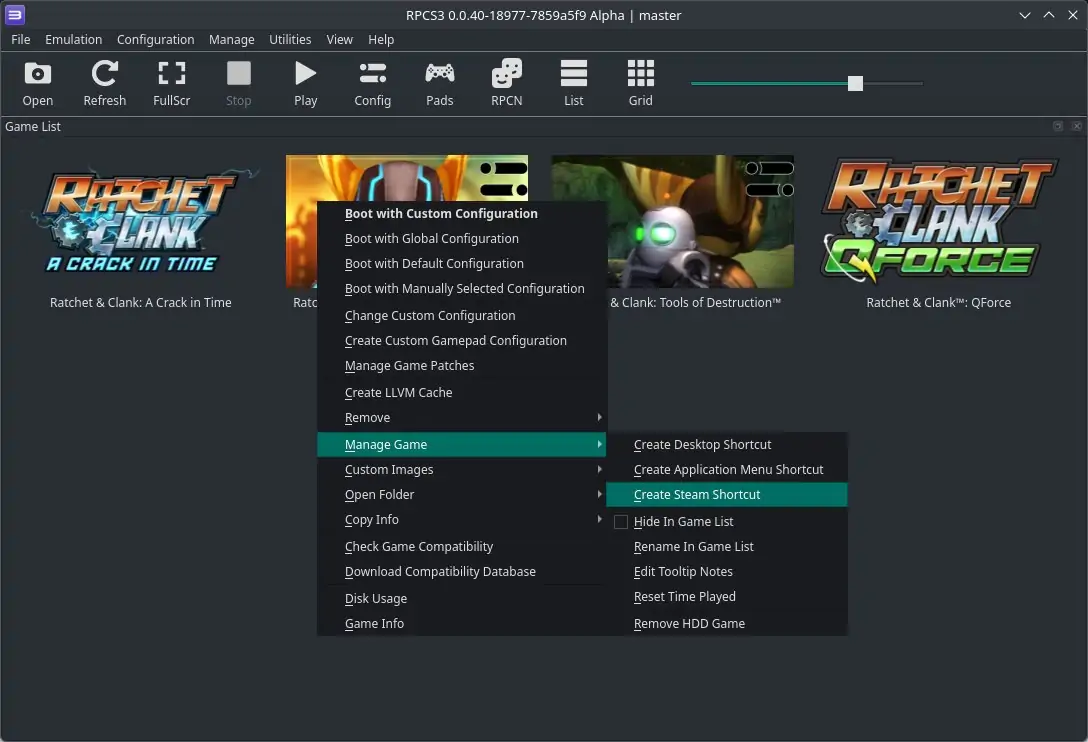
When you launch a PS3 game through Steam this way, it shows up on your friends list as the actual game, not the emulator. So instead of your friends seeing you’re running RPCS3, they’ll see you’re playing God of War III, Demon’s Souls, or whatever you happen to be loading up. That’s a small touch that makes the whole experience feel a lot more legitimate and seamless.
On top of that, launching through Steam gives you access to features you wouldn’t normally get inside the emulator, things like Steam’s built-in screenshot tool, screen recording, and automatic playtime tracking. If you’ve ever wanted to know exactly how many hours you’ve put into Persona 5 on RPCS3, now you finally can.
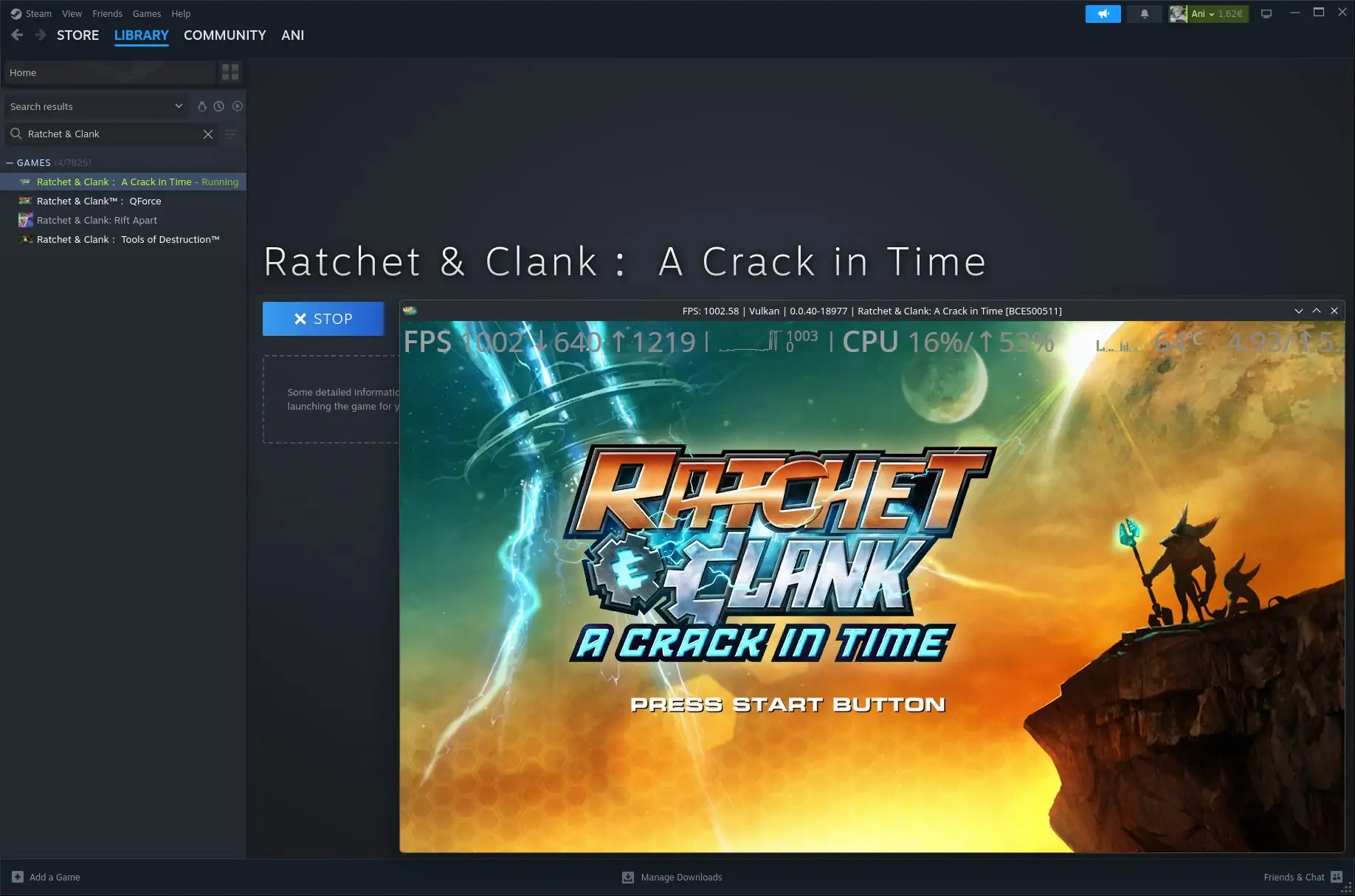
It’s the kind of update that doesn’t reinvent the wheel, but makes everything feel noticeably more polished. And it says a lot about where the RPCS3 team’s head is at, they’re not just keeping the lights on, they’re actively making the experience better.
And the team didn’t stop there. In a follow-up update, RPCS3 confirmed that games added to Steam will also display the PS3 artwork that comes bundled with the game files. That means your Steam library won’t just have the shortcuts, it’ll actually look the part, with proper cover art for each title, just like any other game in your collection.


Steam Deck users, there’s a catch
For those running RPCS3 on a Steam Deck, this update applies to you too, but it’s not completely plug-and-play just yet.
The Steam Shortcut feature does have Steam Deck compatibility, but you’ll need to do some tinkering if you want the box art and the full setup working the way you’d want. It’s manageable if you’re already comfortable in desktop mode, but it’s not a one-click solution out of the box.
That said, this feature is part of a broader push the RPCS3 team has been working on. The emulator has been testing several improvements aimed specifically at gaming handhelds, including reducing how often Steam Deck users need to drop into desktop mode just to manage their games. The goal is to make the whole thing feel native, less like a workaround, more like an actual gaming setup.
For Steam Deck owners, the combination of this Steam Shortcut feature and the handheld UI improvements currently in the pipeline could make RPCS3 feel like a proper first-class experience on the device.
RPCS3 in 2026: The numbers speak for themselves
It’s easy to forget just how remarkable RPCS3 actually is. When the project launched back in 2011, the consensus in the tech world was pretty much unanimous, the PlayStation 3’s Cell processor architecture was so complex that emulating it on a standard PC was wishful thinking. The Cell was widely considered one of the most challenging processor architectures of its generation, and yet here we are.
Today, RPCS3 can play almost two thirds of the PS3’s entire commercial library from start to finish. Out of more than 3,500 tested games, over 2,600 are considered fully playable, meaning you can complete them with solid performance and no game-breaking issues. That’s an incredible milestone for a community-driven, open-source project.
The emulator runs on Windows, Linux, macOS, and FreeBSD, and it’s been pushing the boundaries of what’s possible for years. They implemented save states back in 2022, something the community had long considered technically impossible given the hardware they’re replicating. They brought native ARM64 support to macOS devices. They’ve kept chipping away at performance improvements for lower-end CPUs. The Steam Shortcut feature is just the latest step in that same direction: listen to the community, remove friction, make things better.
The timing also feels significant. Sony’s PlayStation Classics catalog on the PS5 has largely left PS3-era games out in the cold, there’s a massive chunk of that library that simply isn’t available anywhere on modern hardware. For a lot of people, RPCS3 is the only real option for accessing those games today. Having them show up properly in your Steam library, with playtime tracking and everything, feels like giving that era the respect it deserves.
What do you think about RPCS3 letting you add PS3 games directly to Steam? Is this the update that finally gets you to try the emulator? Let us know in the comments!