



Managing OptiScaler manually is not a fun experience. Every game requires you to navigate to its installation folder, identify the correct executable structure, drop in the right DLL files, and start the configuration process from scratch. For one or two titles it is tolerable. For an entire library it becomes a tedious, repetitive task that most people simply do not want to deal with.
Agustinm28, a developer on GitHub, built OptiScaler Client specifically to solve that problem. Released on March 17, with its latest update landing on March 26, the tool is a free, open-source desktop utility built with C# and Avalonia UI that centralizes the installation, management, and updating of OptiScaler across your entire game collection. The project has already picked up over 337 stars on GitHub in just a couple of weeks, which says a lot about how badly the community needed something like this.
Before getting into the client itself, it helps to understand what OptiScaler actually is, because without that context the value of this tool does not fully land.
What OptiScaler does and why it matters
OptiScaler is an open-source mod that acts as a compatibility bridge between your GPU and the upscaling technologies built into modern PC games. If a game ships with DLSS support only, OptiScaler can intercept those calls and redirect them to FSR or XeSS instead. The reverse works too. It also enables frame generation in titles that do not officially support it, and it integrates Fakenvapi to give AMD and Intel GPU users access to latency reduction features like Anti-Lag 2 and LatencyFlex.
The mod supports DirectX 11, DirectX 12, and Vulkan, the latter being a more recent addition that expanded FSR 4 access to a new category of games. It has accumulated over 7,600 stars on the OptiScaler GitHub repository, and outlets like PC Gamer and Tom’s Hardware have covered it extensively. The mod does things GPU manufacturers technically could do themselves, but have chosen not to.
Recent updates have added FSR 4 Vulkan support via DX12 interop, XeSS 3.0 SDK integration, FSR4 model selection, and bundled both Fakenvapi and Nukem’s dlssg-to-fsr3 directly into the mod. It has become a genuinely powerful tool, but that power has also made it more complex to manage manually across a large game library. That is the gap the OptiScaler Client fills.
A closer look at what the client offers
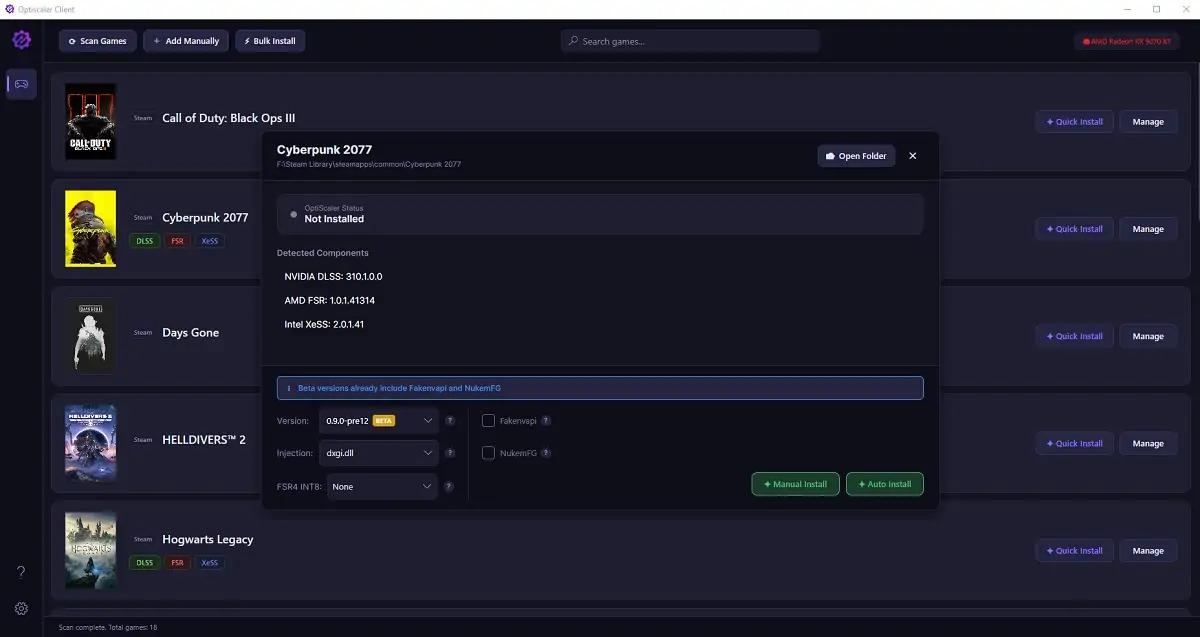
The first thing the client does when you open it is scan your game libraries. A single click on the Scan Games button automatically detects installed titles across Steam, Epic Games, GOG, EA, Ubisoft, Battle.net, and Xbox. For standalone or DRM-free games outside those platforms, an Add Manually option lets you point the app to any folder directly.
Once your library populates, managing OptiScaler for any title is straightforward. You click the Manage button next to a game, select your desired OptiScaler version, and hit Auto Install. The client downloads the release, identifies the correct executable path, and places the files where they need to go. If a game uses a non-standard folder structure, a Manual Install option lets you select the executable yourself.
The client also gives you direct control over additional OptiScaler components. Fakenvapi, Nukem’s DLSSG-to-FSR3 frame generation bridge, and FSR 4 INT8 injection for non-RDNA 4 GPUs can all be toggled from within the interface. A cache management section helps keep storage clean as mod versions accumulate over time.
The app itself is a fully self-contained single-file executable. No external .NET runtime installation is required. It runs on Windows 10 and Windows 11, and it supports multiple languages including English, Spanish, and Brazilian Portuguese. You download it, run OptiscalerClient.exe, and it works immediately.
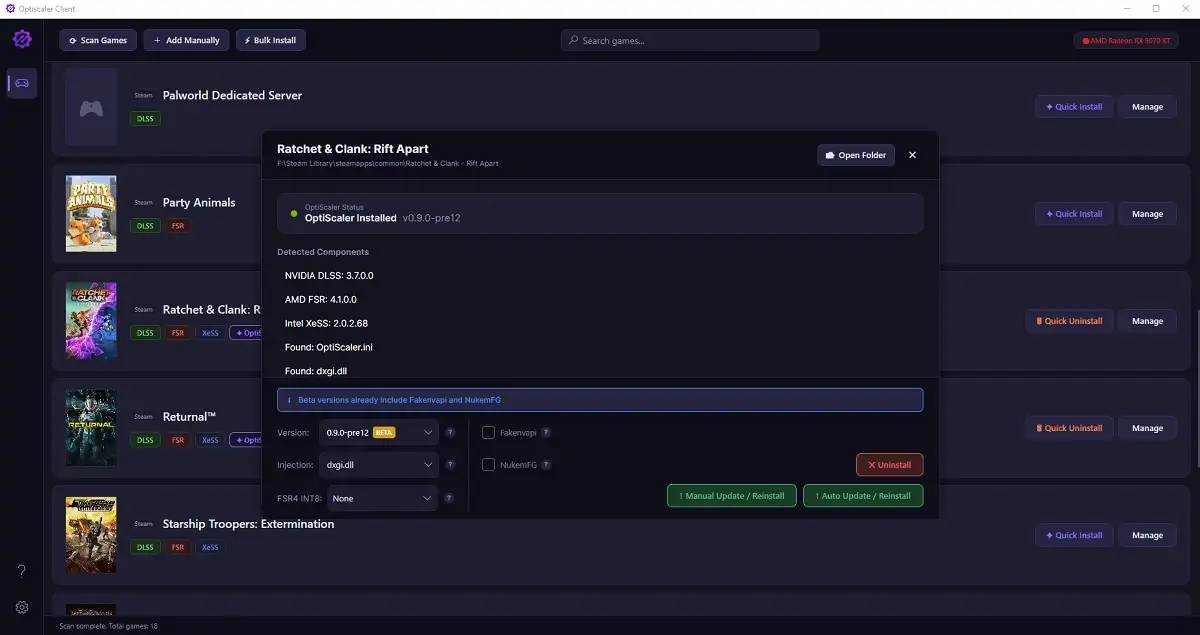
Once OptiScaler is installed in a game through the client, the in-game overlay remains accessible the same way it always has. Press Insert while in-game and the full OptiScaler menu opens, allowing you to adjust upscaling settings, switch technologies, and fine-tune quality presets in real time without leaving the game.
A personal project with a clear purpose
Agustinm28 is transparent about what this tool is and is not. The GitHub repository includes a disclaimer stating clearly that this is not an official OptiScaler project and that the developer has no affiliation with the OptiScaler team. It is a personal project developed without commercial purpose, distributed under the GPL-3.0 license.
The project is open to contributions. Anyone interested can fork the repository, create a feature branch, and submit a pull request. The latest release, version 1.0.3, is available on the GitHub releases page.
For anyone who has been using OptiScaler manually across multiple games, or for anyone who has been curious about the mod but found the manual setup process too involved, the OptiScaler Client is a practical and well-executed solution. It does not change what OptiScaler does. It just removes the part of the process that nobody enjoys.
If you would like to know more about the use of this mod before installing it, YouTuber Ancient Gameplays published a video covering how to use the OptiScaler Client from start to finish, including installation, FSR 4 INT8 configuration, and customization options.
Have you tried OptiScaler in your game library? Tell us in the comments which title you tested it on first, we want to know!