


There’s a very specific kind of frustration that hits tabletop creators. You’ve spent weeks, maybe months, building a combat system that genuinely slaps, writing lore that makes your playtesters lean forward in their chairs, and designing encounter tables with real mechanical teeth. Then you paste it all into a Google Doc, export it as a PDF, and it looks like a university syllabus. Your brilliant game suddenly feels like homework.
The indie TTRPG scene is absolutely booming right now. Itch.io alone hosts tens of thousands of indie and zine-style tabletop games, and the community keeps growing. But the difference between a game that gets downloaded and played versus one that gets downloaded and forgotten often has nothing to do with the mechanics, it’s the presentation. Formatting your rulebook well isn’t a nice-to-have. It’s part of the design.
Here’s how to take your raw document and turn it into something people actually want to pick up and read.
Structure first, design second
Before you touch a single font or color palette, you need a solid skeleton. Rulebooks have a natural flow that experienced players expect, and fighting against that structure makes your game harder to learn and harder to run at the table.
A standard layout that works for most indie games goes like this: Cover, then Core Concept covering what the game is and what’s the vibe, then Character Generation, Core Mechanics, Gear or Spells or Abilities, and finally Tables and Appendices. This order isn’t arbitrary, it mirrors how a new player mentally processes a game. You hook them with the concept, ground them in who they’ll be playing, then teach them how the dice actually work.

Visual hierarchy is what separates a rulebook from a wall of text. Headings aren’t just cosmetic, they’re functional. Players at the table are constantly scanning mid-session, and if your section titles don’t stand out immediately, what should be a five-second lookup becomes a five-minute argument. Callout boxes matter too.
Flavor text, designer notes, rule exceptions, and corner cases all deserve their own visually distinct containers. Something as simple as a light-gray background box with a thin border separates mechanical information from lore that sets the mood. Keep text contrast high and legible, dark text on a light background is still the most readable combination for long-form reading, especially when someone is squinting at a phone screen by lamplight at game night.
The tools you need and what they actually cost
You do not need InDesign. You do not need a design degree. Canva is the most beginner-friendly option and has a surprising number of RPG-adjacent templates to start from. It’s browser-based, exports clean PDFs, and the learning curve is almost flat. The limitation is that it can feel constrained for complex multi-column layouts.
Affinity Publisher is the professional-tier choice for creators who want maximum control without Adobe subscription fees. As of late 2025, following Canva’s acquisition of Serif, Affinity Publisher is now completely free, you just sign in with a free Canva account to download it, and AI features are an optional paid add-on through Canva Pro.
It handles master pages, baseline grids, and linked text frames the same way InDesign does, which makes it an incredibly strong option now that the price barrier is gone entirely. For those who want a fully standalone tool with no account required, Scribus is completely free and open-source, with solid output quality and good community documentation, though the interface is less polished than the alternatives.
For page sizing, A5 is the sweet spot for digital zines, it’s half a sheet of A4, feels like a real booklet, and works beautifully on tablets. US Letter works well if a significant portion of your audience plans to print at home.
Whatever you choose, leave at least 0.5 inches of margin on every side, and bump that to 0.75 inches if print-at-home is part of your plan. Nothing kills a home-printed zine faster than text disappearing into the binding fold. Keep file size in mind too, embedded high-resolution art can balloon a PDF fast. For print-ready files, 300 DPI is the industry standard.
If your zine is screen-only and you need to keep things manageable, export at a lower image quality setting in your layout software and just make sure the text stays sharp.
Stop making players download a file
Here’s something nobody talks about enough: a PDF is actually a pretty bad format for the gaming table.
Players open PDFs on phones, and phones hate PDFs. The zoom-and-scroll experience is miserable. Files sit in downloads folders and never get found again. Sharing a link to a massive file over Discord means half your players simply won’t bother opening it.
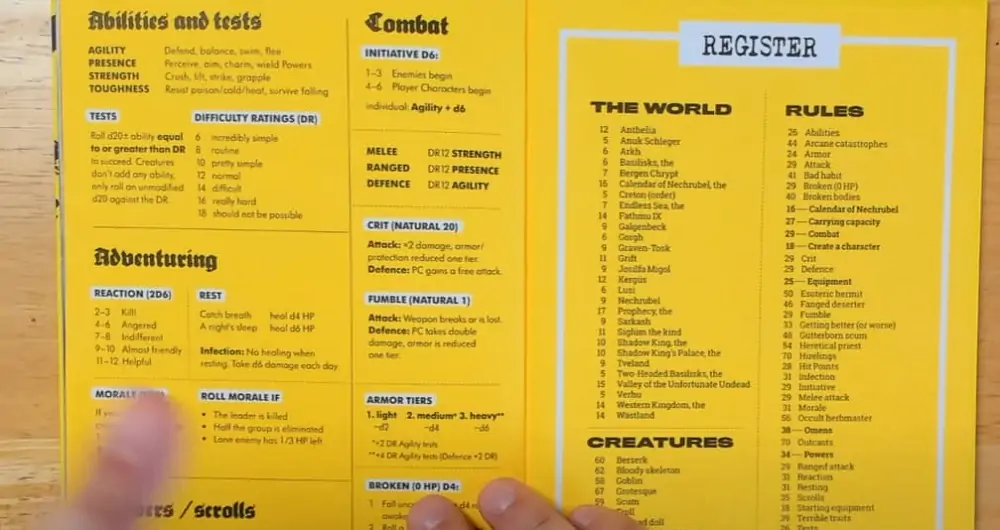
The smarter move is presenting your zine as a web-native experience, something players can open instantly from any device, no download required. Instead of forcing players to download massive, static files to their devices, you can convert your PDF to a digital flipbook. This allows your community to instantly flip through your custom rulebook or artbook directly in their browser with a premium, tactile feel.
That page-flip experience isn’t just a gimmick, it preserves your layout exactly as designed, works on mobile without zooming nightmares, and feels genuinely premium compared to a raw PDF link.
Think about the difference between sending your players a download link versus sending them something that opens immediately to a beautifully formatted, interactive version of your rulebook. One feels like sharing a passion project. The other feels like attaching a homework assignment.
Once your file is ready, Itch.io is the first stop for almost every indie TTRPG creator. It’s creator-friendly, has a massive built-in community actively looking for exactly what you’re making, and takes a smaller cut than most platforms, the default is just 10% versus the industry standard 30%.
You set your own price, including pay-what-you-want, which works remarkably well for debut projects. DriveThruRPG reaches a slightly different audience, more traditional tabletop gamers who’ve been in the hobby longer, and it’s worth having your product on both platforms simultaneously since they don’t conflict.
The community-building piece is where a lot of first-time publishers leave easy wins on the table. Don’t launch cold. Spend a few weeks beforehand sharing teaser content,a single spread from your rulebook, a character sheet preview, a piece of original art.
Reddit communities like r/rpg, r/osr, and r/DungeonMasters are genuinely receptive to indie creators sharing works in progress as long as you’re engaging authentically.
Discord is where your long-term community lives, find servers dedicated to indie TTRPG design, participate in conversations, and share your project there. X still has an active tabletop corner if you use the right hashtags: #TTRPG, #indierpg, and #zine all reach people who are actually looking for new games. Launch day should never be day one of your online presence. Give people something to anticipate.
Are you working on an indie TTRPG or zine right now? Drop it in the comments, we’d love to know what you’re building!