



A developer going by Gavin-S-Dev published on March 24, 2026 a custom Dolphin build called Better Wii Menu, For Dolphin Emulator, and it does exactly what every Wii emulation fan has quietly wished for: it makes your disc image files show up as actual channels on the Wii System Menu.
We’re talking .rvz, .iso, .wbfs, .gcz, .ciso, and .wia, the formats sitting in your game library right now, appearing on that iconic white channel grid, ready to launch with a point and a click of the Wii Remote, just like the real thing.
The project lives on GitHub as a fork of the official Dolphin emulator, meaning it inherits everything Dolphin already does well, solid GameCube and Wii emulation, widescreen support, higher resolution rendering, save states, Bluetooth Wii Remote passthrough, and adds one focused, quality-of-life feature on top of all that.
No extra complexity, no trade-offs. Just your game library, finally living where it belongs.
Your games as channels, automatically
The centerpiece of Better Wii Menu is automatic syncing. The build reads your existing Dolphin game library and populates the Wii System Menu with your games as channels, replicating the same visual experience you’d get from actual WAD installations. Each game shows up with its banner in its slot on the menu grid, ready to be selected with the Wii Remote, no keyboard, no mouse, no jumping back to the Dolphin interface.
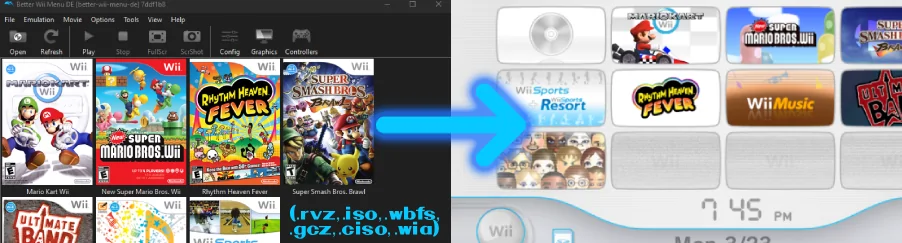
If you want manual control, you get that too. Right-clicking any game directly in Dolphin’s game list gives you the option to add or remove it from the Wii Menu individually, without touching the rest of your library. And setup takes about thirty seconds: download the build, extract the zip, run BetterWiiMenuDE.exe, and load the Wii Menu. Your games will already be there. If you’d rather skip the Wii Menu and launch directly into a game from Dolphin, that option stays available, both workflows coexist without conflict.
The repository is publicly available on GitHub, built primarily in C++, consistent with Dolphin’s own codebase, and open to contributions from the community.
Why this fills a gap that’s been there for years
Dolphin has supported the Wii System Menu for a while now. As of version 5.0-4588, you can install it directly through Tools → Perform Online System Update, which pulls the files straight from Nintendo’s servers. It works, it looks great, and it adds a level of authenticity to the emulation experience that a plain game list simply can’t match.
The problem has always been the next step: once the Wii Menu is up and running, your disc image files don’t show up as channels. You’d have to exit the menu entirely, go back into Dolphin, and launch the game from there, which breaks the immersion completely.
On a real modded Wii, homebrew loaders like USB Loader GX and WiiFlow solved this exact problem years ago, displaying your game collection as a full visual library you could browse and launch directly from the console. Dolphin never had an equivalent for the Wii Menu, until now.
It’s also worth understanding why the format support matters here. The .rvz format was developed by the Dolphin team itself in 2020, built on top of Wiimm’s WIA format, and designed specifically for real-time emulation performance with lossless compression, it’s the modern standard for Dolphin game libraries.
The .wbfs format, on the other hand, became the go-to in the Wii homebrew community for storing games on USB drives, so there are huge amounts of game collections out there still using it. By supporting all of these formats natively as channels, Better Wii Menu works with whatever you already have, no conversion needed.
A small project with a big payoff for Wii fans
Better Wii Menu isn’t trying to reinvent Dolphin. It’s a focused fork with a specific goal, bridging the gap between having the Wii System Menu running and actually using it as a practical game launcher, and it hits that goal cleanly. The result is that booting into the Wii Menu in Dolphin stops being a nostalgic novelty and becomes a genuinely usable front end for your entire game library.
For anyone who grew up with the Wii and wants to relive that experience as faithfully as possible on PC, seeing Super Mario Galaxy or The Legend of Zelda: Twilight Princess sitting in a channel slot on that white menu, and having it launch with a Wii Remote click, is the kind of small detail that makes emulation feel complete. That’s exactly what this build delivers.
Tried Better Wii Menu yet, or do you still launch your Wii games the old-fashioned way through Dolphin? Tell us how you run your setup in the comments!